
Can Bidders Be Required to Verify Their Email When They Create an Account?
BidWrangler includes an feature that can require each new bidder to confirm their email address before they can use their account. When email verification is on, a new bidder receives an email with a confirmation link after they sign up. The bidder must click that link before they can sign in and register for your auctions.
This feature can only be enabled by BidWrangler. To turn it on, please reach out to helpdesk@bidwrangler.com.
Should I Turn On Email Verification?
For most auction companies, we recommend leaving email verification off. It solves a narrow problem, and it adds friction that can stop some real bidders from getting into your auctions. Weigh these points before you ask us to turn it on.
Pros
Every new account has a confirmed email address that the bidder can access
Invoices, outbid notifications, and other emails go to the right person, not to someone whose address was mistyped
Bidders can’t create accounts with fake addresses or that they don't own, which adds a small barrier against throwaway accounts
Cons
Some bidders won’t finish signing up. The bidder has to leave your site, find the email, and click the link. Some bidders don’t, and they never get back to register
Confirmation emails can be delayed or land in spam. Until the bidder finds the email, they can’t sign in. This hurts most right before an auction closes, when a bidder is trying to sign up and bid in the same few minutes
Bidders will contact you when they’re stuck. Expect more calls and emails from bidders who say they can’t sign in or register. In many cases, you’ll need to confirm their accounts yourself in the Admin Portal
It doesn’t confirm who the bidder is. A fake bidder can still confirm a real email address that they control. Card verification and new bidder approval do more to protect you from bidders who don’t pay
Our recommendation
If you’re concerned about fake or non-paying bidders, start with credit card verification at registration and/or manual approval of new bidders. Consider email verification only if wrong email addresses are a repeated problem for you, and you’re ready to help bidders who don’t get the confirmation email. If you turn it on and the extra bidder questions outweigh the benefit, email helpdesk@bidwrangler.com and we’ll turn it back off.
How Do I Turn On Email Verification?
Email helpdesk@bidwrangler.com and ask us to turn on email verification for your bidding platform. This setting isn't in your Company Settings, so our team turns it on for you. You can also ask us to turn it off at any time.
What Does the Bidder See?
The bidder signs up with their name, email address, and password
BidWrangler sends a confirmation email to the address they entered
The bidder clicks the link in that email to confirm their address
The bidder can now sign in and register for your auctions
Until the bidder confirms their address, they can't sign in
Troubleshooting: What If a Bidder Doesn't Get the Confirmation Email?
First, ask the bidder to check their spam or junk folder. Then check that the email address on their account is spelled correctly. If the address is wrong, the bidder should create a new account with the correct address.
If the address is correct and the email still hasn't arrived, you can confirm the bidder's account yourself:
Go to Admin Portal > Users
Find the bidder's account click the pencil icon to edit
In the Confirmed at field, enter any date and time in the past
Save
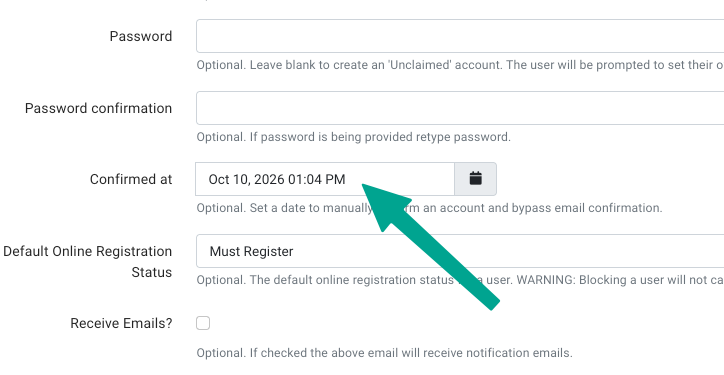
The bidder can now sign in without clicking the confirmation link. Only do this when you're sure the email address belongs to the bidder, because a manual confirmation skips the check that email verification exists to do.
Frequently Asked Questions
Can I turn email verification on myself? | No. Email helpdesk@bidwrangler.com and our team will turn it on or off for you. |
A bidder says they never got the confirmation email. What should I do? | Check the spelling of their email address first. If it's correct, set the Confirmed at field on their account to any time in the past, as described above. |
Does email verification stop fake bidders? | It stops bidders from using an email address they can't access. It doesn't verify a bidder's identity, so keep using card verification and bidder approval for that. |
Does Email Verification Replace Other Bidder Checks? | No. Email verification only confirms that the bidder can receive email at the address they entered. It doesn't confirm who the bidder is. For more protection, use it with your other bidder checks, such as card verification at registration, manual approval of new bidders, and Block Threshold. See How to Block a Bidder in BidWrangler for Block Threshold. |