
How do I link multiple auctions together for invoicing? (Using Linked Auction Groups)
The linked auctions feature gives you the option to link multiple auction containers into one auction event. Perhaps you are running two rings in an auction. Or maybe your auction spans multiple days. Using the new linked auctions feature, you can now get combined invoices and reports from multiple auction containers. You can still catalog into multiple groups, but your paddle numbers, invoices, etc., will be treated as one auction, simplifying time consuming administration tasks!
Auctions that can be linked
Any combination of timed, timed-to-live, and live auctions can be linked
Auctions can be combined even if they have different terms, however - whatever terms you set in the Linked Auction Group will override the terms of the individual auction
Auctions can be linked even after they have started and have registrations and bids
When auctions are combined any existing registrations will be assigned a higher paddle number in order to avoid conflicts of paddle number
Terms and Conditions
The terms set in the Linked Auction Group will override the terms of the individual auctions. This means that you can set your auctions up with 'Confirm no terms' checked, but add terms to the LAG and bidders will be prompted to agree to those terms.
If you have different terms in your individual auctions, then unless you can combine them into a single set of terms and save those the the LAG it may not be appropriate to link these auctions.
If you have already created auctions with different terms before linking them, you can update the terms via the LAG settings and this will not send a notice to any bidders who have already registered. If the new terms are different, consider whether you may wish to cancel existing registrations for legal reasons, and have bidders re-register, or confirm the new terms in writing.
Clerking and Permanent Bidder Numbers in a Linked Auction Group
Clerking to permanent bidder numbers works seamlessly inside Linked Auction Groups. Bidders keep a consistent number across the auctions in the group, and the group continues to reassign conflicting paddle numbers automatically when auctions are linked, so you do not need to manage numbering by hand across containers.
To create a Linked Auction Group (LAG)
From the left-hand menu, select Linked Auction Groups and click +Create
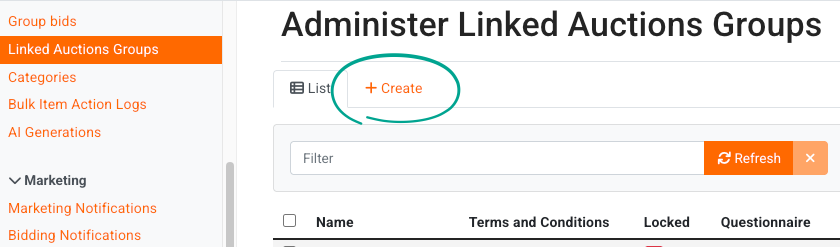
You must give your Linked Auction Group (LAG) a name - this is internal, and won't be seen by bidders, so choose a name that works for you.
You can then choose your other settings as needed - these can be set on either the individual auctions in the group, within the LAG itself.
Which settings belong to the group and which stay on each auction?
A linked auction group and the auctions in it control different settings. The group controls registration and paddle numbers for the full event. Each auction keeps its own settings for everything else.
Setting | Where it belongs | What it controls |
|---|---|---|
Starting online paddle number | Linked auction group | The first paddle number that the group gives to online bidders. |
Starting live paddle number | Linked auction group | The first paddle number that the group gives to live bidders. |
Point of Sale Convenience Fee | Either | One fee for the point of sale payments in the group. You can also set this fee on each auction and in your company settings. See the next section for which fee applies. |
Terms | Each auction | Each auction keeps its own terms. Auctions in one group can use different terms. |
Invoice settings | Each auction | Each auction keeps its own invoice settings. |
Dates | Each auction | Each auction keeps its own dates. |
Auction type | Each auction | Each auction stays timed, timed-to-live, or live. One group can contain a mix of auction types. |
When you link an auction, the group does not change the settings on that auction. Registrations that exist on the auction before you link it can conflict with the group's paddle number settings. The next section shows the error that this conflict causes and the fix.
To link auctions
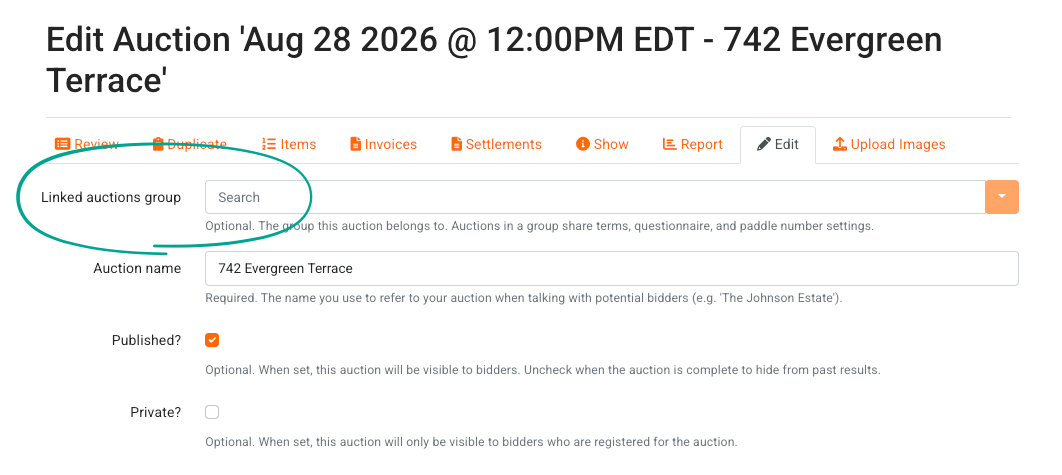
Once you have created the LAG go to the edit screen of the auctions you wish to link.
A new field is available at the top of the auction settings - use this drop-down to select the appropriate Linked Auction Group and save.
Why do I get a duplicate paddle number error when I link an auction?
The error occurs when the auction already has registrations and their paddle numbers are in the group's range. The system cannot create paddle numbers in a range that is already in use. For example, an auction with registrations from paddle number 6,000 cannot join a group that also starts online paddle numbers at 6,000.
Follow these steps to remove the conflict:
Open your linked auction group in the admin area
Find the highest online paddle number in the auction that you want to link
Set the group's starting online paddle number to a value greater than that highest number
Link the auction again
If the error continues, find the highest live paddle number in the auction
Set the group's starting live paddle number to a value greater than that highest live paddle number
Link the auction again
FAQ
Can I combine a timed (silent) auction and a live auction in one event? | Yes, this is one of the most common uses of a linked auction group. Create the group, then create a live-only auction with a name, description, start date, and the Offline Auction box checked under live auctions, and assign the group to both auctions. Use the same terms for both, check in bidders through Live Registrations on sale day, and clerk the live session from the Live Clerking Panel. |
Does automatic invoice creation work across a linked auction group? | Yes. With auto invoice creation enabled in your invoice settings, invoices update every time a lot is sold in any auction in the group, so a bidder's purchases from the different containers accumulate as the event runs. See How do I enable automatic invoice creation? for the setting itself. |
What order do items appear in on invoices that span linked auctions? | Items display on invoices in alpha-numerical Lot ID order, with letters sorting ahead of numbers, so "Lot 1" appears ahead of "1" or "1A." If two auctions in the group use identical Lot IDs, those items fall back to creation date order. The order is the same whether invoices are auto-generated or created manually, and it still applies when an invoice was marked paid and additional items sell afterward. If invoice order matters to you, give each auction in the group a distinct lot numbering scheme. |
Can bidders or staff search items across every auction in the group at once? | No. There is no single search that spans the auctions in a linked auction group today; each catalog is searched on its own. As a workaround for pickup and phone support, generate a Buyer's Guide PDF for each auction and share the downloaded files with your team, which also works without an internet connection. |
Can I unlink an auction from a linked auction group? | No. After the auctions in a group have registrations and bids, you cannot unlink an auction from the group. The support team can help you move an auction out of a group. Please send an email to helpdesk@bidwrangler.com if you must separate an auction from its group. |
Do bidders keep the same paddle number in every auction in the group? | Yes. A bidder registers one time for the group and keeps one paddle number across the auctions in the group. Clerking to permanent bidder numbers also works inside Linked Auction Groups. |
Can I link an auction that already has registrations and bids? | Yes, you can link an auction after it starts. The system gives a higher paddle number to the registrations that exist on the auction. If those paddle numbers are in the group's range, the link fails with a duplicate paddle number error. The fix for this error is in the section above. |
Can I charge one point of sale convenience fee across every auction in my group? | Yes. Set the Point of Sale Convenience Fee on the Linked Auction Group form and it will cover the group's point of sale payments. The form's help text explains how the group fee interacts with any fee set on an individual auction. |