
How do I enable automatic invoice creation?
Enabling Auto Invoice Creation
This feature is disabled by default, but can be enabled in Company Settings with the checkbox, "Enable auto invoice creation"
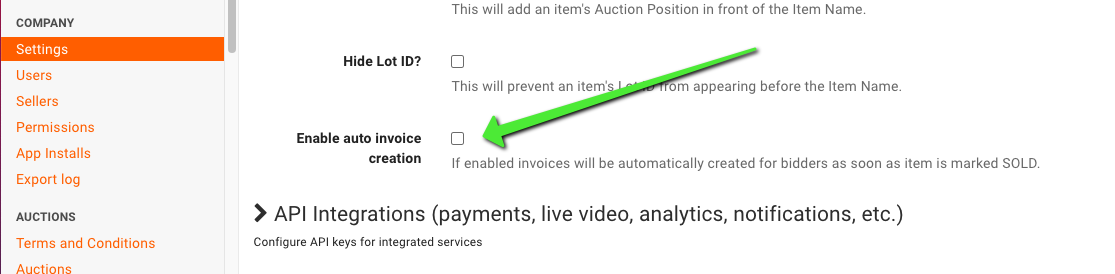
Once turned on, bidders will have invoices created automatically whenever an item is sold. If the buyer has already purchased an item (and thus already has an invoice), the second item they win will automatically be added to their invoice.
When this feature is enabled, there will be no need to "Create Invoices" (unless an invoice was deleted) or "Regenerate" an invoice to see newly purchased items.
When to Turn Automatic Invoice Creation Off
Automatic invoice creation fits most timed and live sales, but there are cases where disabling it for a specific auction is the better choice:
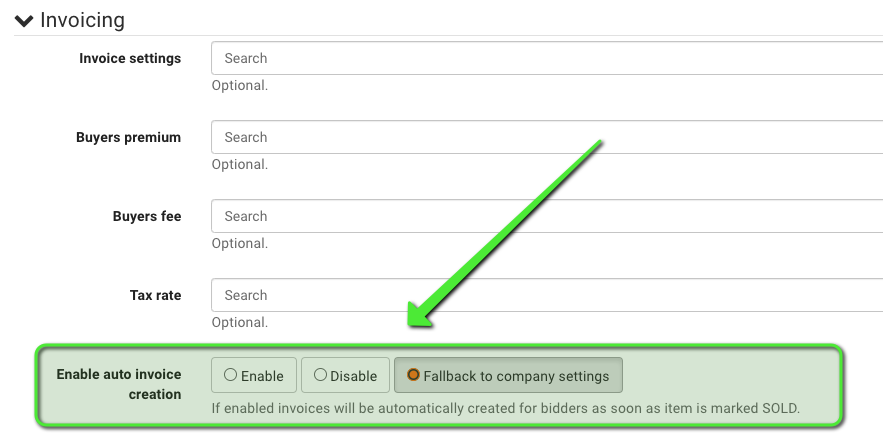
Sales where you do not want a standard invoice generated, such as the occasional real estate auction. Turn off auto-invoicing for that auction while leaving it enabled for everything else, using the auction-level toggle.
Sales where you want to review results before any invoices exist. With the feature on, an invoice is created the moment an item is marked sold to a registered bidder, and later purchases are added to that same invoice as the sale runs. If your closeout workflow is to reconcile sale results first and then create all invoices in one pass at the end, disable auto creation for that auction and use Create Invoices when you are ready.
Because the toggle exists at both the company and auction level, the practical pattern is: leave it on at the company level, and switch it off per auction for the exceptions.
Frequently Asked Questions
Q: Will items appear in a different order if I create invoices manually instead?
A: No. Items display on invoices in alpha-numerical Lot ID order either way, with letters sorting ahead of numbers, and items with identical Lot IDs falling back to creation date order. Whether the invoice was auto-generated or created manually makes no difference to the order.
Q: Why did a sold item not generate an invoice even with the feature on?
A: Automatic invoice creation only invoices registered bidders. If an unregistered paddle number is entered when an item is sold, the item is sold to a floor bidder and no invoice is created. Register the bidder through the Live Registrations Panel and re-clerk the item by hitting SOLD, and the invoice can then be generated. See Why don't my bidders have invoices?
Q: Does auto-invoicing keep adding items to an invoice that is already paid?
A: Yes. BidWrangler adds later purchases by the same buyer to the existing invoice, even after the invoice is paid and locked. The invoice then shows the new balance due. BidWrangler does not email the bidder when it adds items, so email the updated invoice to tell the bidder. Items added later still sort into the invoice by Lot ID.
Q: Does automatic invoice creation work in a linked auction group?
A: Yes. Invoices are updated every time a lot is sold at any auction in the group. See How do I link multiple auctions together for invoicing?