
How do I use the Seller Summary Multi-Auction Report?
The Seller Summary is a Multi-Auction Report in the BidWrangler admin portal. It totals one seller's activity across all of your auctions in one screen. You can filter and sort by seller name, seller number, location, total paid, total commission, lots sold, and auctions sold in. You can also export the results as a CSV file.
When to run a Seller Summary instead of opening each settlement
Run the Seller Summary when a seller asks for totals across many auctions. For example, a seller consigns items in many auctions across the year and wants one total. Before this report, the answer was to open each settlement one at a time. The Seller Summary gathers those totals in one report and links to the seller's settlements.
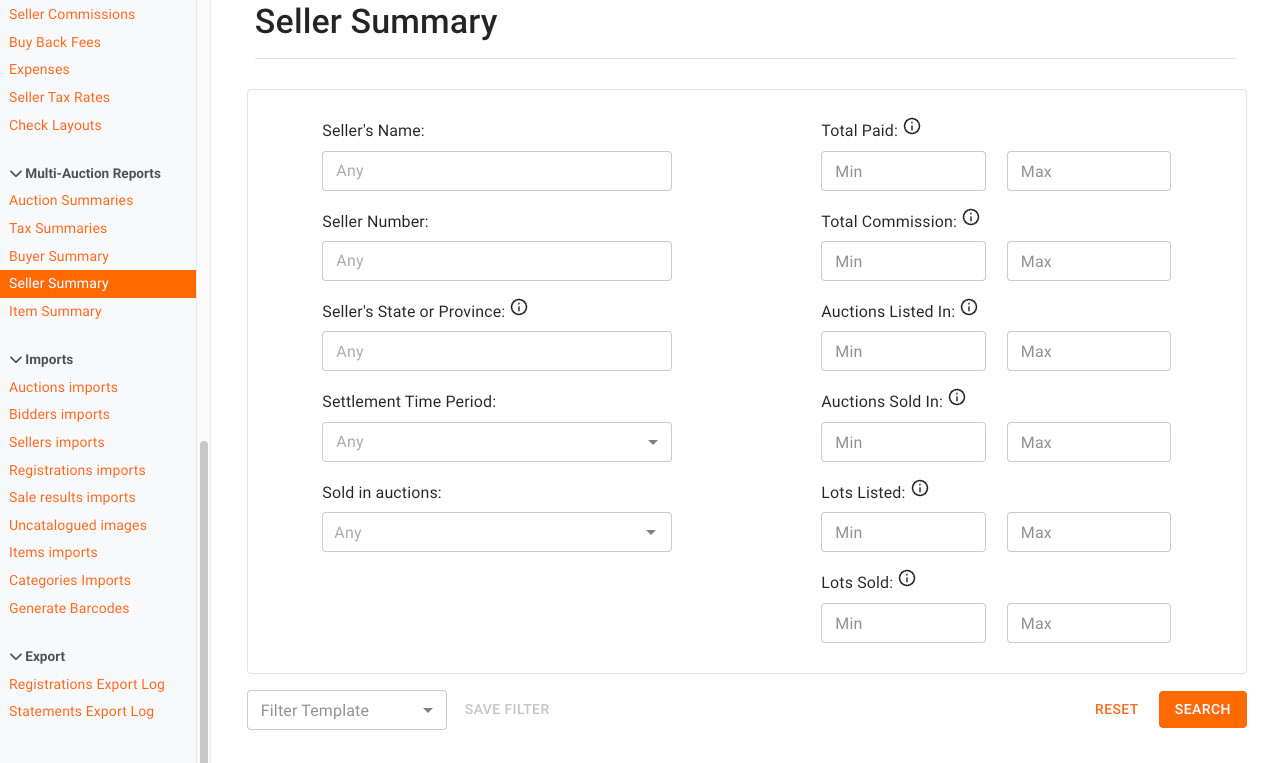
How to run the Seller Summary report
Log in to the BidWrangler admin portal
Scroll down to the "Multi-Auction Reports" section in the left-hand menu
Click "Seller Summary"
Enter the filters for your search. For example, enter the seller name or the seller number
Scroll down to examine the report results
To keep the data, export the results as a CSV file
How to open a seller's settlements from the report
The report links to the filtered settlements for each seller in your results. Click the link to open all of those settlements at one time. You can then export those settlements for detail at the lot level.
What the Seller Summary does not show
The Seller Summary does not show the hammer price. To get the hammer price across all of a seller's lots, open the seller's settlements from the report. Export those settlements, then total the column that holds the hammer price.
FAQ
Can I see the hammer price for each lot in the Seller Summary?
No. The Seller Summary shows totals such as total paid and total commission. To total the hammer price, open the seller's settlements from the report, export them, and total the column that holds the hammer price.
How do I see every lot one seller sold?
Open the seller's settlements from the Seller Summary report link. You can also run the Item Summary report and enter the seller in the "Buyer or Seller" filter. The Item Summary lists each lot with its sale information.
What is the difference between the Seller Summary and the Buyer Summary?
The Buyer Summary totals a bidder's purchases across all auctions on your platform. The Seller Summary totals a seller's sales, commission, and lots sold across your auctions. Both reports are in the "Multi-Auction Reports" section of the admin portal.
Can I export the Seller Summary?
Yes. The Seller Summary has full CSV export support. You can also open the seller's settlements from the report and export those for lot-level detail.
Do I need to run the report one auction at a time?
No. The Seller Summary is a multi-auction tool. One report covers a seller's activity across all of your auctions, with filters to narrow the results.
Related articles
If you have questions about the Seller Summary report, contact us at helpdesk@bidwrangler.com. We are happy to help.