
How to Fix the Stripe Card Token "End of Life" Error in BidWrangler
The Stripe error "Card Token usage on the Customers API and Charges API has reached end of life" shows that Stripe blocks the card Tokens that BidWrangler uses to process bidder credit cards. To fix this error, turn on the Using card Tokens for payments API policy in your Stripe Dashboard. After you save the change, contact BidWrangler support so that we can complete the integration test.
What the Error Message Says
The error message displayed when encountering this issue is as follows:
Error: Card Token usage on the Customers API and Charges API has reached end of life. In order to continue processing your payments, you will need to use the Payment Intents and Payment Methods API. Read more about what you should do here: https://docs.stripe.com/payments/payment-methods/integration-options. If you need to continue to use Card Tokens on the Customers and Charges API, enable this functionality in your API policies settings: https://dashboard.stripe.com/settings/developers/api-policies
When You'll See the Card Token End of Life Error
The error appears in red text under the credit card form when a bidder registers for an auction. Until the policy is on, bidders cannot save a credit card at registration.
This error occurs most often on Stripe accounts that are new to BidWrangler. In our tests, Stripe accounts that already process payments through BidWrangler did not show this error. New Stripe API keys do not fix the error. Only the Stripe API policy fixes it.
What You Need Before You Change the Stripe Policy
You must have a login to the Stripe account that is connected to BidWrangler.
You must have this link ready to paste into a Stripe form: https://support.bidwrangler.com/en/articles/2676224
Stripe can ask for more security steps when you log in. The error message also gives a direct link to the API policies page: https://dashboard.stripe.com/settings/developers/api-policies
How to Turn On "Using card Tokens for payments" in Stripe
Log in to the Stripe Dashboard.
In the top-right corner of the Stripe Dashboard, click Settings.
On the Settings page, select Developers.
Select the API policies tab.
In the Policy column, find Using card Tokens for payments.
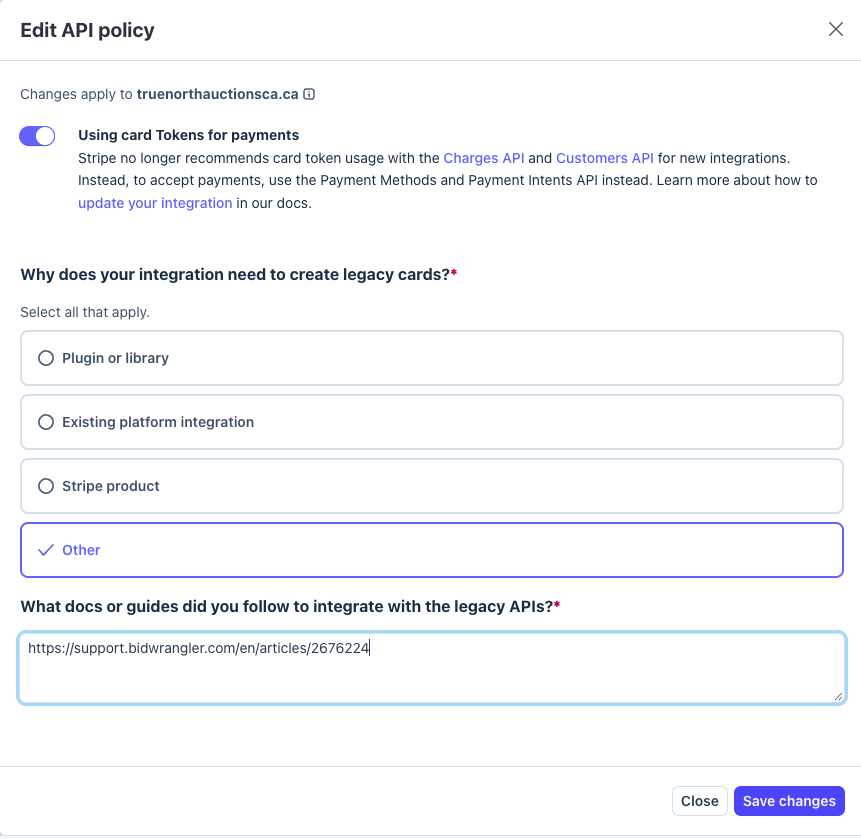
In the Edit policy column on the same row, click the pencil icon. The Edit API policy window opens.
Click the toggle next to Using card Tokens for payments to turn on the policy.
Under Why does your integration need to create legacy cards?, select Other.
In the What docs or guides did you follow to integrate with the legacy APIs? field, paste this link: https://support.bidwrangler.com/en/articles/2676224
Click Save changes.
Make sure that the Status column shows Enabled for Using card Tokens for payments.
Send an email to helpdesk@bidwrangler.com to tell us that you saved the change.
After we get your email, BidWrangler support completes the integration test on your account.
FAQ
What does "Card Token usage on the Customers API and Charges API has reached end of life" mean?
Stripe no longer recommends card Tokens with the Customers API and Charges API for new integrations. The BidWrangler Stripe integration uses card Tokens with these APIs. Stripe blocks them until you turn on the Using card Tokens for payments API policy.
Why can't bidders save their credit card when they register?
If the Using card Tokens for payments policy is off in your Stripe account, Stripe rejects the card. The bidder then sees the end of life error under the credit card form. Turn on the policy to let bidders save a credit card again.
Do I need new Stripe API keys to fix this error?
No. New Stripe API keys do not fix the card Token end of life error. The fix is the Using card Tokens for payments API policy in your Stripe Dashboard. You do not need to change any settings in BidWrangler.
Will this error affect my auctions if my Stripe account already works with BidWrangler?
In our tests, Stripe accounts that already process payments through BidWrangler did not show this error. The error appeared on Stripe accounts that were new to BidWrangler. If a bidder reports this error on your auction, follow the steps in this article.
What do I select for "Why does your integration need to create legacy cards?"
Select Other. Stripe then shows a second field that you must complete: What docs or guides did you follow to integrate with the legacy APIs? Paste https://support.bidwrangler.com/en/articles/2676224 into that field, then click Save changes.
Who needs to turn on the policy, BidWrangler or my company?
The Using card Tokens for payments policy is a setting in your own Stripe account. A person with a login to your Stripe account must turn it on. After that, send an email to helpdesk@bidwrangler.com so that BidWrangler support can complete the integration test.
Related Articles
If you need help with this change, please contact us at helpdesk@bidwrangler.com.