
Why Isn't a User Receiving Emails From My BidWrangler Platform?
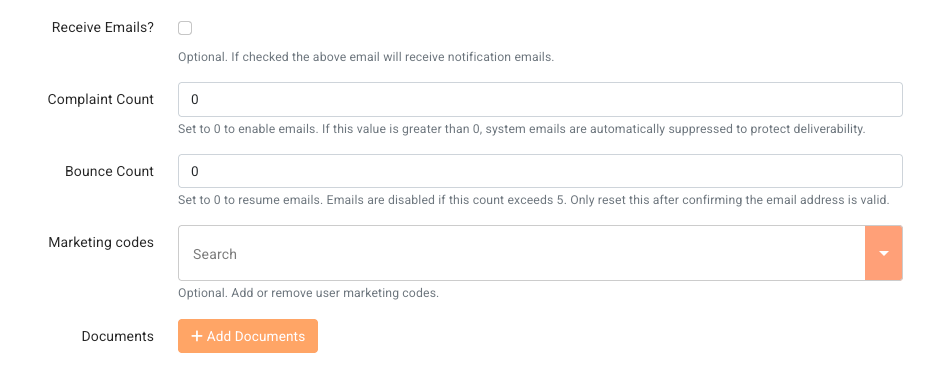
If a user does not receive emails from your BidWrangler platform, look first at the Complaint Count and Bounce Count fields on that user's account. If the Complaint Count is more than 0, the platform stops all emails to that user. If the Bounce Count reaches 5, the platform also stops all emails to that user. You can change each field back to 0 after you fix the cause.
The email address that your platform sends from also affects delivery. A domain-based email address helps more of your emails reach the inbox.
Complaint Count and Bounce Count at a Glance
Field | What increases the count | When emails stop | How to turn emails on again |
|---|---|---|---|
Complaint Count | The user flags or reports a platform email as spam or junk. | When the value is more than 0 | Ask the user to mark you as a safe contact. Then change the field to 0. |
Bounce Count | An email from the platform does not deliver to the user. | When the value reaches 5 | Fix the cause of the bounce. Then change the field to 0. |
Which Platform Emails a User Can Stop Receiving
Bidders can receive several types of email from your platform:
Registration confirmation
Bidding notifications. A bidder receives these only if the bidder has Receive bidding notifications via email turned on.
Clerking notifications. A bidder receives these only if the bidder has Receive bidding notifications via email turned on.
If a user flags any one of these emails as spam, the platform stops all future emails to that user. This includes invoices and registration confirmations.
How a Complaint Count Stops Emails to a User
The Complaint Count increases each time a user flags or reports an email from your platform as spam or junk. If the Complaint Count is more than 0, the platform does not send more emails to that user.
If you see a value more than 0 in this field, you can change it to 0 to turn on emails again for that user.
Unless the user takes action, the count will probably increase again. For example, the user can mark you as a safe contact in the user's email program.
Use clerking notifications sparingly. Each extra email increases the risk that a bidder flags your emails as spam.
How a Bounce Count Stops Emails to a User
The Bounce Count increases each time the platform tries to send an email to a user and the email does not deliver. When the Bounce Count reaches 5, the platform does not send more emails to that user.
Common Reasons an Email Bounces
The email address has a spelling error.
The email address is fake or a placeholder.
The recipient's inbox is full. The recipient must make space in the inbox to receive more emails.
The email is larger than the recipient's size limit. This is rare, because platform emails are small. Emails with PDF attachments are larger, for example emailed invoices and settlements.
The recipient's email account does not exist anymore.
The recipient's mail server is temporarily down.
The recipient's domain is parked or suspended. The domain is the part of the email address after the "@" symbol.
After you find and fix the cause, you can change the Bounce Count to 0.
How to Find Out Why a User Isn't Getting Emails
In your admin portal, click Users.
Find the user by name or email address.
Open the user's account.
Look at the Complaint Count field. A value more than 0 shows that the user flagged a platform email as spam.
Look at the Bounce Count field. A value of 5 shows that five emails to this user did not deliver.
Examine the email address for spelling errors and placeholder text.
If the user does not get bidding notifications but would like to, make sure that Receive bidding notifications via email is on.
How to Reset Complaint Count or Bounce Count to 0
If the Complaint Count is more than 0, ask the user to mark you as a safe contact.
If the Bounce Count is 5, fix the cause of the bounce. Use the list in Common Reasons an Email Bounces.
In your admin portal, click Users.
Open the user's account.
Change the value in the Complaint Count field or the Bounce Count field to 0.
Click Save.
Why a Domain-Based Email Address Helps Your Emails Reach Bidders
A domain-based email address uses your own company domain, for example info@yourauctioncompany.com. A free email address uses a public provider domain, for example @gmail.com, @yahoo.com, or @aol.com.
Platform emails go out from your company's email address. Free email providers like Gmail and Yahoo do not approve outside services to send email from their domains. Because of this, many mail servers move these emails to spam or reject them.
Each rejected email increases the Bounce Count for that user. Emails in the spam folder also make complaints more likely, and one complaint stops all emails to that user.
A domain-based email address lets your own domain approve the emails that your platform sends. This gives your emails a better chance to reach the inbox. It also shows bidders a professional address that they can trust.
Please reach out to BidWrangler Support at helpdesk@bidwrangler.com for assistance with setting up and verifying a domain-based email.
FAQ
Why did a bidder suddenly stop getting emails from my auction platform? The most common cause is a Complaint Count more than 0 or a Bounce Count of 5 on the bidder's account. Either value stops all platform emails to that bidder. Open the bidder's account from the Users screen and look at both fields.
What are Complaint Count and Bounce Count in BidWrangler? Complaint Count and Bounce Count are two fields on each BidWrangler user account. The Complaint Count tracks how many times the user flagged a platform email as spam. The Bounce Count tracks how many platform emails did not deliver to the user.
Does one spam report stop all emails to a bidder? Yes. A Complaint Count of 1 stops all platform emails to that bidder. This includes invoices, registration confirmations, and bidding notifications.
How many bounces does it take before BidWrangler stops sending emails? The platform stops all emails to a user when the Bounce Count reaches 5. After you fix the cause of the bounces, you can change the Bounce Count to 0.
Can I reset a user's Complaint Count to 0? Yes. You can change the Complaint Count to 0 on the user's account to turn on emails again. Ask the user to mark you as a safe contact first. If the user does not do this, the count will probably increase again.
What should I do if a bidder's email address is misspelled? Correct the email address on the bidder's account. Then change the Bounce Count to 0 so that the platform sends emails to the bidder again.
Why are my auction emails going to spam? Three common causes are a free sender address, a high number of emails, and bidders who flag your emails as spam. A domain-based email address helps your emails reach the inbox. Use clerking notifications sparingly to keep the number of emails low.
Why should I use a domain-based email instead of Gmail or Yahoo? Gmail, Yahoo, and other free providers do not approve outside services to send email from their domains. Mail servers often move these emails to spam or reject them. A domain-based email address lets your own domain approve the emails that your platform sends.
Related Articles
If a user still does not receive emails after these steps, contact us at helpdesk@bidwrangler.com. We are happy to help.