
How do I add a third party bidding URL?
Sometimes you may want an auction hosted on another bidding platform to appear on your BidWrangler app or website. You can do this by adding the auction’s third-party bidding URL.
A third-party bidding URL allows the auction to appear in BidWrangler while directing bidders to the external bidding platform when they are ready to bid.
Adding a Third Party Bidding URL
From the auction's edit screen, locate the "Third party bidding URL" field:
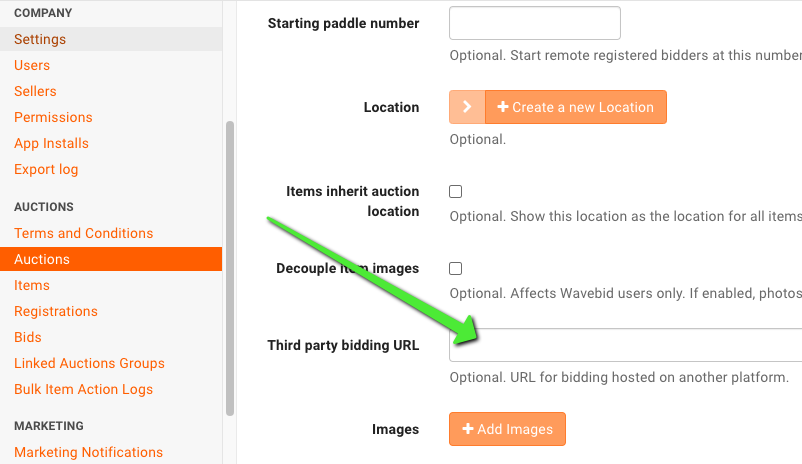
Paste the URL of the auction’s page on the third-party bidding platform into this field.
The behavior of the auction depends on whether or not you have items assigned to it. See How does a third-party auction behave? below for more information.
Required fields
To create an auction specifically for a third-party bidding link, you only need to complete the following fields:
Name
Published - checked
Description
Confirm No Terms - checked
Third Party Bidding URL - paste the link to the external auction here
Timezone
Start Time
Images - optional, but recommended
You do not need to add items if the auction is only being used to direct bidders to the third-party platform.
Optional fields
You may also want to use:
End Time
Timed?
These settings are useful when you want the auction to move to your completed auctions at a specific time.
Important: If you enter an End Time, you must also check Timed?. If Timed? is not checked, BidWrangler will only recognize the Start Time. The auction will remain on the bidding platform and website for 24 hours after the Start Time, regardless of the End Time entered.
How does a third-party auction behave?
The behavior of a third-party auction depends on whether it contains any BidWrangler items.
Auction with no items
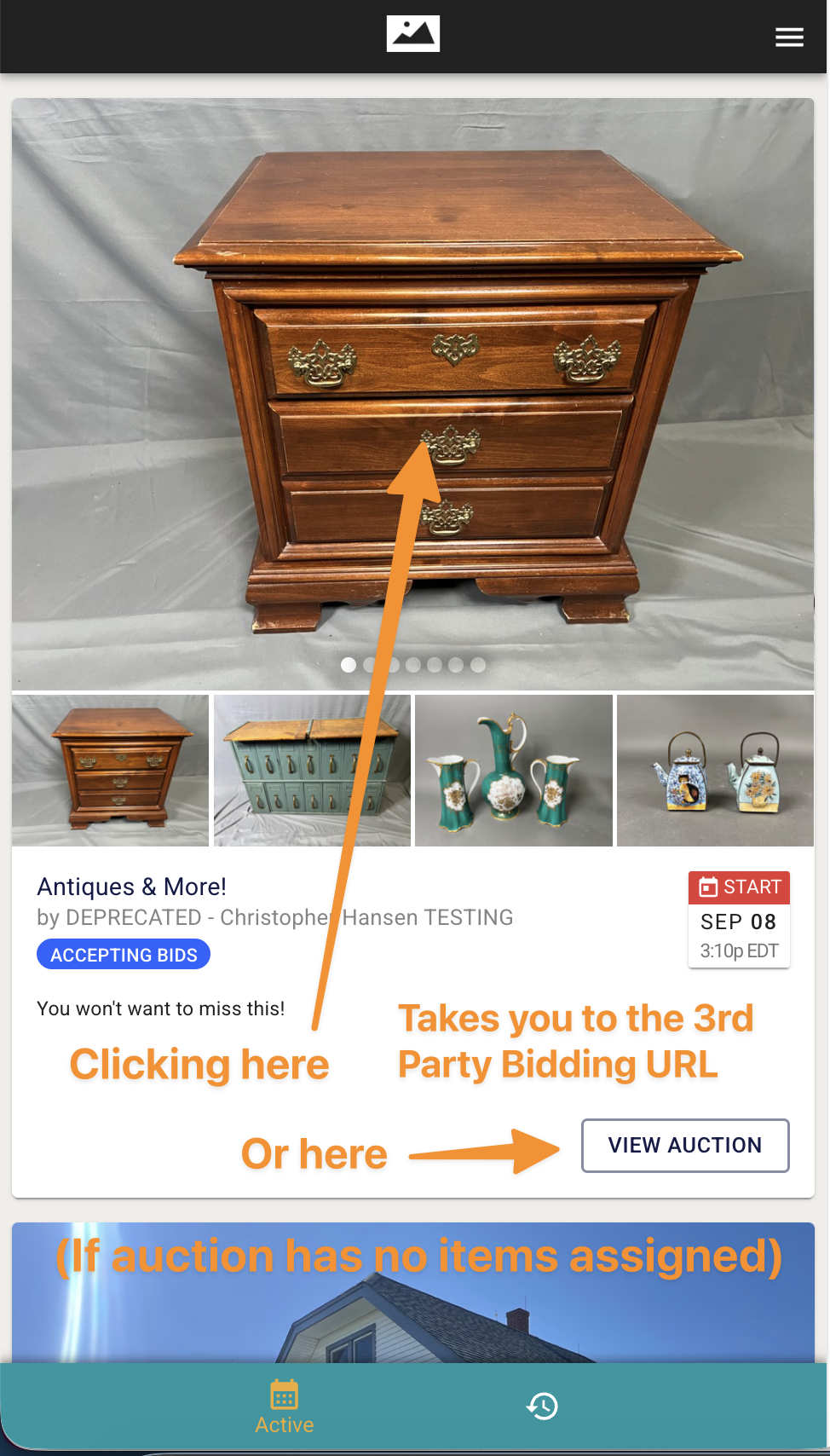
If the auction has no items assigned:
The auction’s View Auction button takes the bidder directly to the Third Party Bidding URL.
Clicking or tapping any auction image from the Home screen also takes the bidder directly to the Third Party Bidding URL.
The auction’s Add Images section can contain up to 10 images.
These auction-level images can be previewed and scrolled through from the Home screen.
This is the simplest setup when you only want the auction to appear on your BidWrangler app or website and then send bidders directly to the external bidding platform.
Auction with one or more items
If you add items to the auction, BidWrangler treats the auction more like a traditional catalog.
Instead of immediately sending the bidder to the third-party URL when they click an image or View Auction, BidWrangler first displays the items you’ve added.
The bidder can view item details and photos before being directed to the external bidding platform.
One item
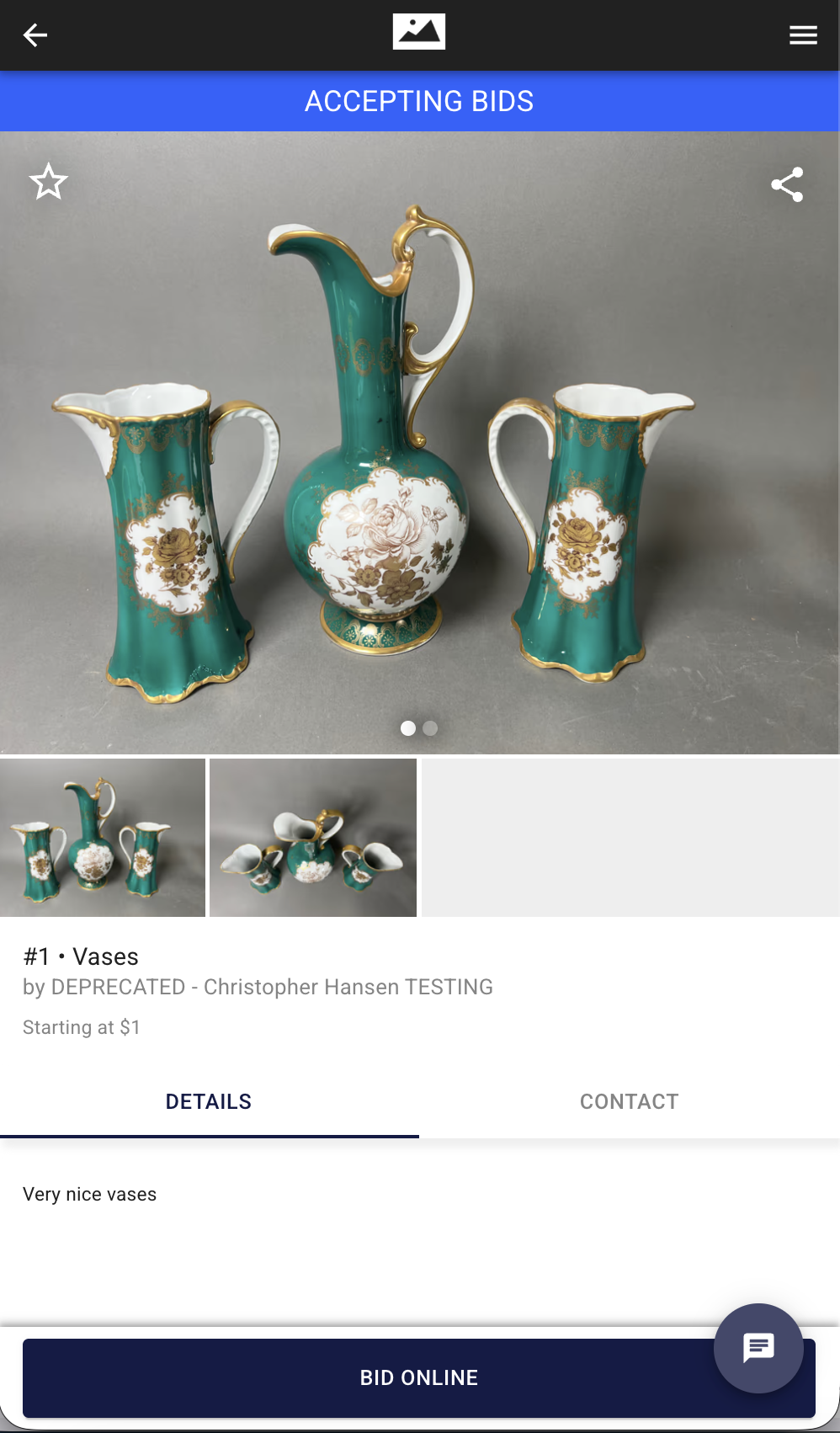
If the auction contains one item, BidWrangler treats it as a single-item/real estate-style sale. Clicking View Auction or an auction image takes the bidder to that item’s description and pictures.
The bidder can then select Bid Online to be taken to the Third Party Bidding URL.
More than one item
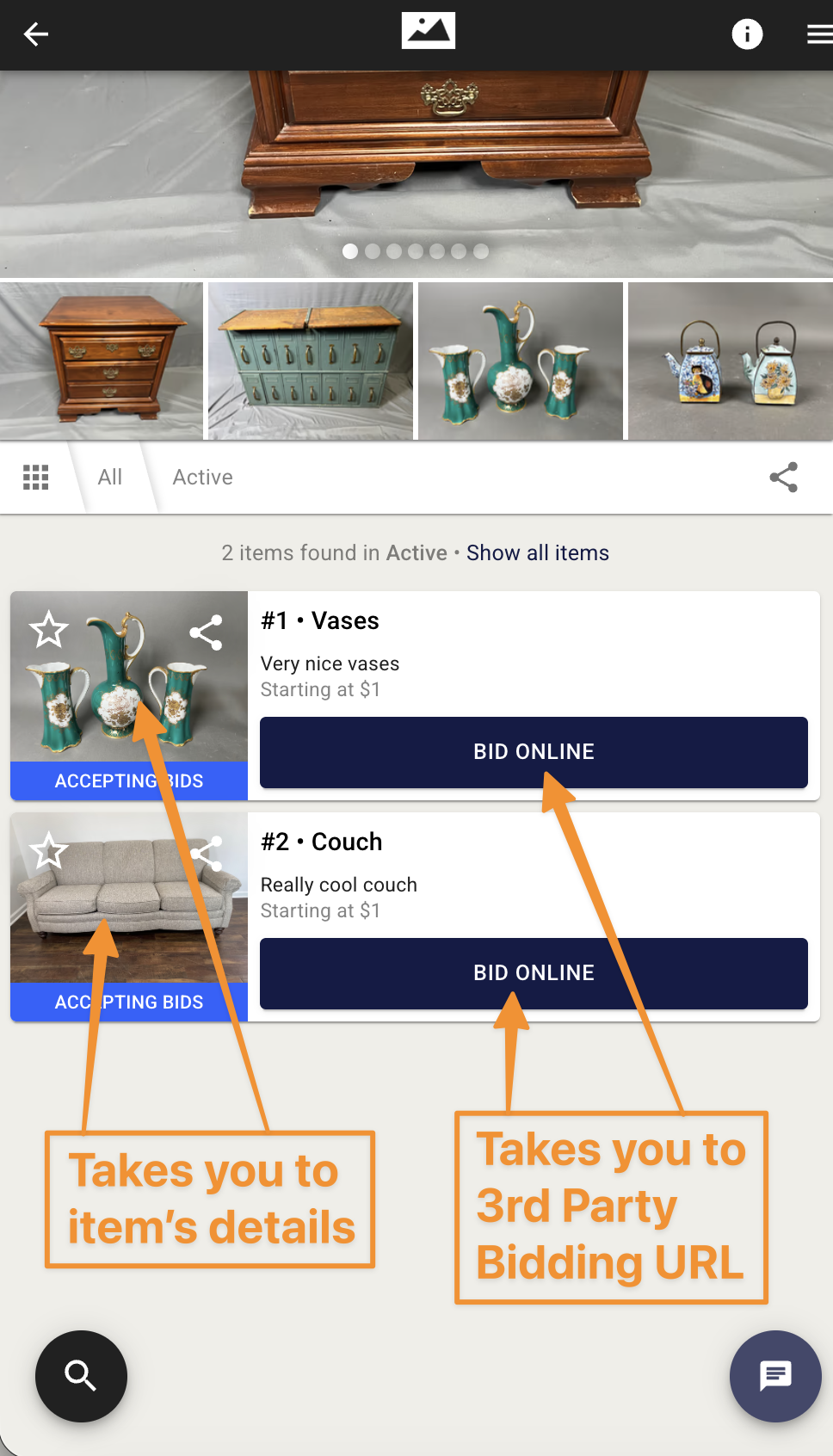
If the auction contains multiple items, clicking View Auction or an auction image takes the bidder to the traditional item-listing screen.
From there, bidders can:
Browse the items.
Click into an item to view its details and pictures.
Click Bid Online to be taken to the Third Party Bidding URL.
This setup can be useful when you want to provide additional information or photos about the sale in BidWrangler before sending bidders to the platform where bidding actually takes place.
How do auction images work?
You can add up to 10 images directly to the auction from the auction settings by clicking Add Images.
The images shown on the Home screen depend on whether the auction has items and whether the auction itself has images.
No items
If the auction has no items, the images assigned directly to the auction are used for the Home screen preview.
Up to 10 auction images can be displayed and scrolled through.
Items and auction images
If the auction has items and has images assigned directly to the auction, the auction-level images take priority.
For example, if an auction has:
5 auction-level images
2 items with multiple images each
The Home screen will show the 5 auction-level images first, followed by the first image from each item, up to a maximum of 10 total preview images.
Items but no auction images
If the auction has items but no images assigned directly to the auction, the first image from each item will be used for the Home screen preview.
The rest of each item's images can be viewed by clicking into the item's details.
FAQ
What do bidders see when I use a Third Party Bidding URL?
The auction can appear in your BidWrangler app and website like any other auction. What bidders see when they click the auction depends on whether items have been assigned.
No items: Bidders are taken directly to the Third Party Bidding URL.
One item: Bidders first see the item’s details and pictures, then can select Bid Online to go to the third-party platform.
Multiple items: Bidders first see the item list and can browse individual items before selecting Bid Online to go to the third-party platform.
Do I need to add items to a third-party auction?
No. If the auction’s only purpose is to display the sale and send bidders directly to another platform, you can leave the auction empty.
Adding items is useful when you want bidders to see a BidWrangler catalog, item descriptions, or additional photos before they are sent to the third-party bidding platform.
Can I add images without adding items?
Yes. You can add up to 10 images directly to the auction using the Add Images button in the auction's settings.
If the auction has no items, these images can be previewed and scrolled through from the Home screen, and clicking an image will take the bidder directly to the Third Party Bidding URL.
What happens if I add items to the auction?
Adding items changes how bidders navigate through the auction.
Instead of going directly to the Third Party Bidding URL when they click an auction image or View Auction, bidders will first see the BidWrangler item information.
With one item, they will see that item’s details and pictures.
With multiple items, they will see the traditional item-listing screen and can browse individual items.
The Bid Online button on the item page takes the bidder to the Third Party Bidding URL.
Which platforms can I link to?
You can link to an auction hosted on any external bidding platform that provides a public auction URL.
For example, this can include platforms such as Proxibid or EquipmentFacts.
BidWrangler simply directs bidders to the URL entered in the Third Party Bidding URL field.
Why does the auction need “Confirm No Terms” checked?
Bidders are not registering or bidding through BidWrangler for a third-party auction. Because BidWrangler’s terms and conditions do not apply to the actual bidding process, there are no BidWrangler terms for bidders to accept.
Checking Confirm No Terms satisfies the required terms field for the auction.
What happens if I enter an End Time but don’t check “Timed?”?
The End Time will not control when the auction is removed from the bidding platform or website.
If Timed? is not checked, BidWrangler will only recognize the Start Time. The auction will remain visible for 24 hours after the Start Time, regardless of the End Time entered.
If you want the End Time to control when the auction moves to your completed auctions, make sure Timed? is checked.
Will I be charged for posting a sale hosting a third party bidding URL?
No. In order for a sale to be considered a billable event, it must have registrations and bids.
Can I use a third-party URL and still show my own item catalog?
Yes. Add your items to the auction and enter the Third Party Bidding URL.
With items assigned, bidders will first be able to browse the BidWrangler item information before using Bid Online to continue to the third-party bidding platform.
Keep in mind that adding items changes the navigation behavior of the auction. Bidders will no longer be sent directly to the third-party site when clicking View Auction or an auction image.
Have more questions about third party bidding URLs? Feel free to reach out to helpdesk@bidwrangler.com at any time - always happy to help!