
Auction Summary Totals Guide
Where do the auction summary totals come from?
Your Auction's Reports tab includes an overview of some statistics about your auction. This article explains where each of these figures are derived from.
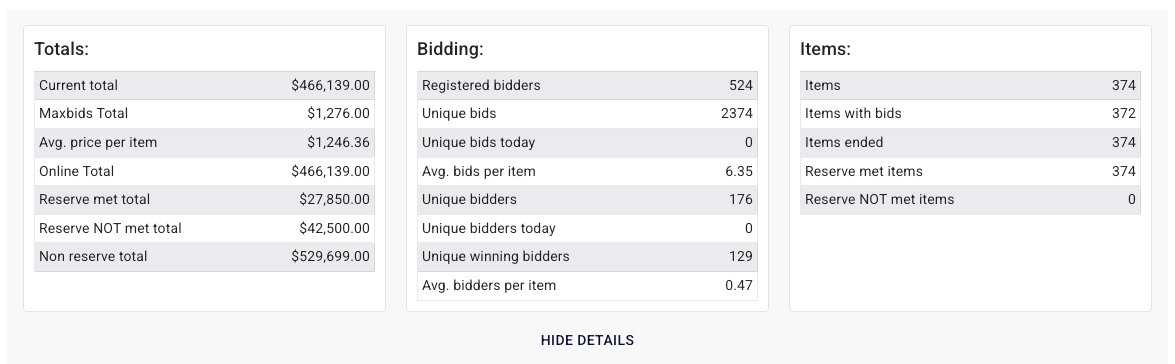
Totals:
• Current Total: This includes all high bids, regardless of whether the items have sold or not. It accounts for sold items, items that “will sell,” and items marked as “no sale.”
• Maxbids Total: This reflects the sum of the highest max bids placed on items that have a max bid entered - it does not necessarily reflect a current high bid on any item.
Both of these can be seen in more detail from your Auction Progress report which breaks lots down into 3 categories:
Will Not sell - items with no bids, or bids under reserve
Will Sell - items with bids above reserve
Sold online/live - items already marked as sold
The current and maxbids totals in the summary are the totals of the two columns on the right of that report.
Avg. price per item - current total divided by the number of items
Online Total - total of high bids on items sold online
Reserve met total - total of high bids on items with a reserve
Reserve not met total - total of high bids on items where the reserve has not yet been met
Non-reserve total - total of high bids on items without a reserve (items with a reserve of $1 are effectively included as having 'no reserve')
Bidding:
Much of this can be broken down from your Administer Bids screen.
Registered Bidders - Total number of unique bidders registered for this auction both Live and Online
Unique Bids - Total of bids places manually by bidders. This will differ from your total bid count in the administer bids screen because of how maxbids are counted. The maxbid is counted as a 'unique bid' but not any subsequent bids placed automatically derived from that maxbid. So if a maxbid of $20 is placed starting at $5 that counts as 1 bid. If someone else bids $10, and the maxbid auto-bids $15, this is still only considered 2 bids in the unique bids total, even though 3 bids will be recorded in the bid history. Bids placed by maxbids display in your administer bids screen with the type 'auto' and are not part of the unique bid count
Unique Bids today - Total bids placed manually (including initial maxbids) today
Avg. bids per item - Total unique bids divided by the number of items
Unique bidders - A unique bidder is counted once a bidder places a manual bid, so this is the total of bidders who have bid manually
Unique bidders today - Total bidders who placed manual bids today
Unique winning bidders - Total of bidders who have the high bid on sold items (this should match your total number of invoices)
Avg. bidders per item - Total number of unique bidders divided by total number of items
Items:
Items - Total number of items in this auction. Also found in the auction review tab
Items with bids - Total number of items in this auction that have bids on them
Items ended - Total number of items marked as sold/no sale
Reserve met items - Total number of items with high bids above the reserve, also detailed in the Auction Progress report (Will Sell)
Reserve Not met items - Total number of items with no bids, or high bids below the reserve, also detailed in the Auction Progress report (Will Not Sell)