
How to Register Bidders using a Driver's License Scanner
You can now capture a bidder's driver's license information using the license scanner feature in Live Registrations. Driver's license scanners allow auction company staff to quickly capture and enter bidders' information at check-in for live/simulcast events. Built-in to the Live Registrations check-in screen, this feature makes this process much more efficient.
Using the "Scan Driver's License" Feature
Scan Licenses from the Live Registrations Screen
From the Live Registrations screen, upon creating a new registration, the interface slides from the right, revealing the Scan Driver's License feature in the top-right corner.
This feature is available within the Live Registrations screen, one of the features exclusive to our suite of live tools. If you do not have this feature and are interested in having these enabled for your company, please reach out to helpdesk@bidwrangler.com for Live Tools Training.
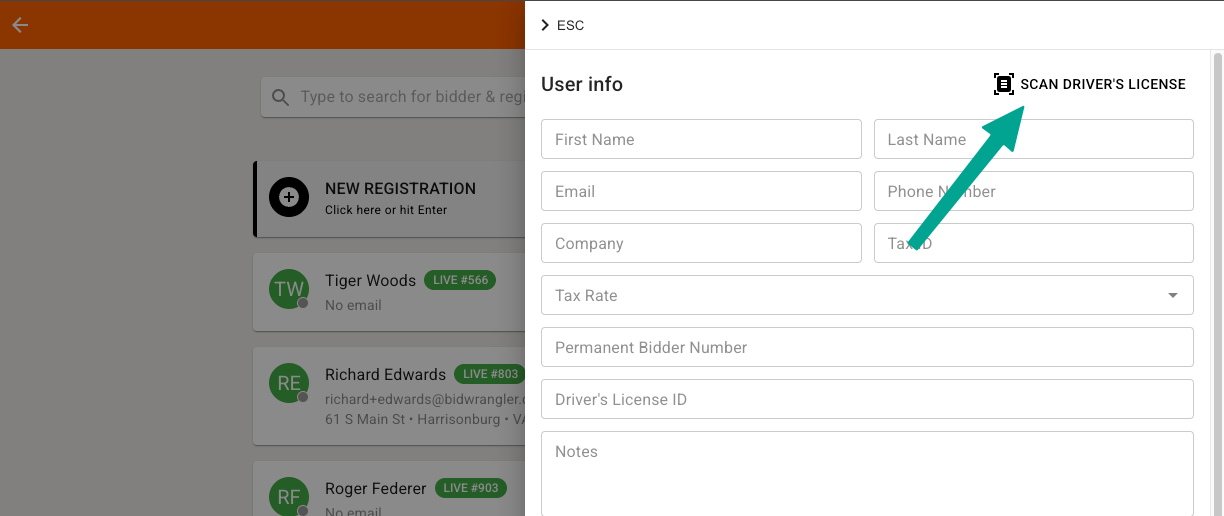
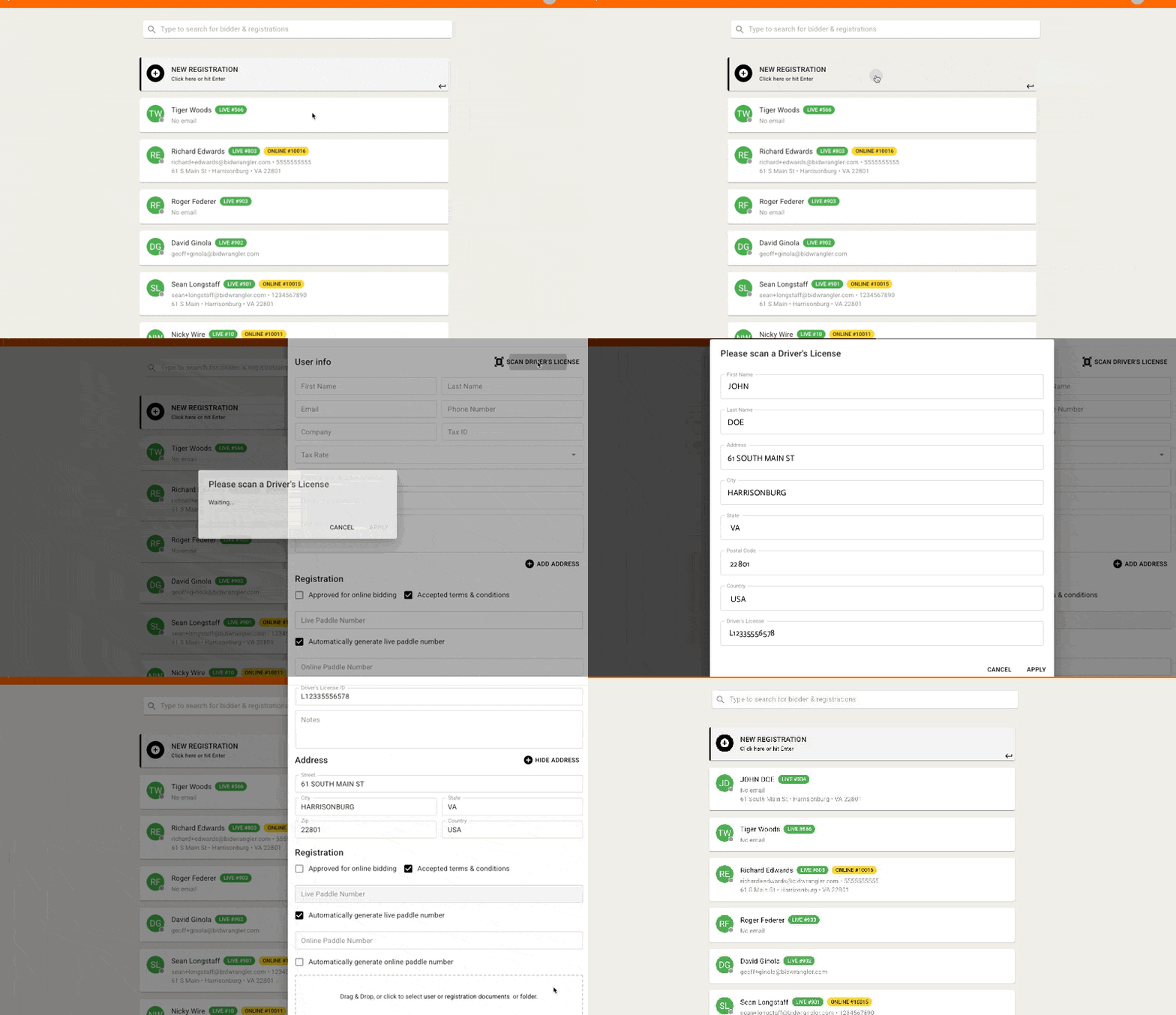
With a supported driver's license scanner {devices listed below} connected to your computer via USB, click the Scan Driver's License button and wait for the prompt to scan the license - this should take a few seconds. Once scanned, the license information will appear in a new pop-up - click APPLY to add those details to the registration.
Below is a quick demonstration (you can refresh the page to re-watch):
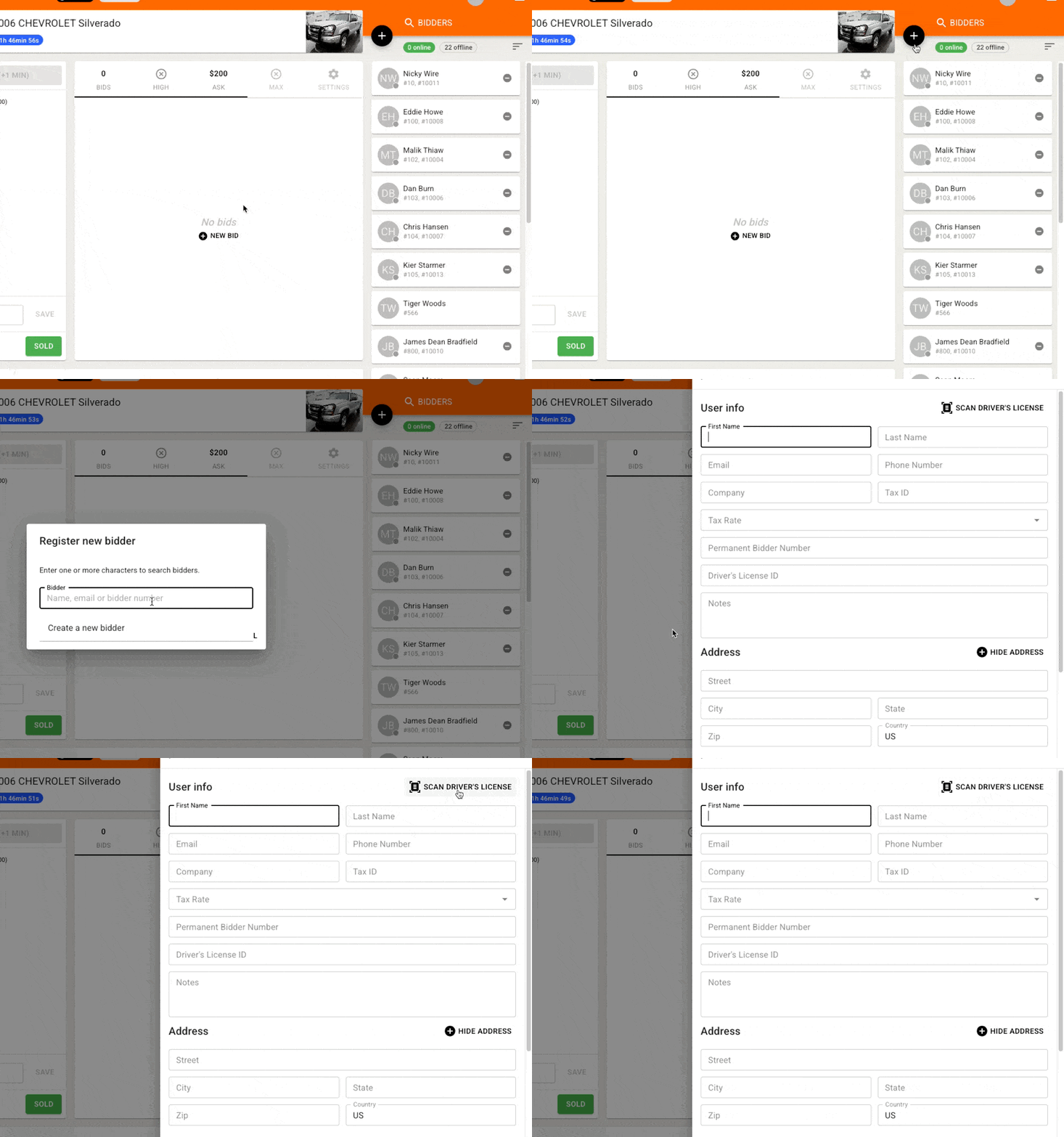
Scan Licenses from the Online Clerking Panel
This feature is also available in the Online Clerking Panel when adding a new bidder and operates the same.
Compatible 2D Scanners
Honeywell Genesis 7580G
Honeywell Genesis XP 7680G
Honeywell Orbit 7190G
Honeywell 1450G
We appreciate feedback from our clients! - If you have a different model from those listed above, and have successfully used this feature, please let us know so that we can update this article.
Driver's License Troubleshooting
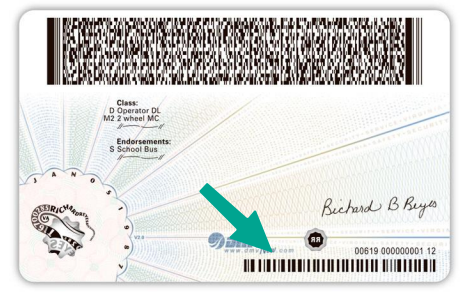
Misreading or Errors Reading on the Wrong Barcode
Some licenses include two barcodes on the back of the card; the scanner may try reading both or the wrong barcode, so make sure you physically cover any additional barcodes to avoid scanning both.
How to Fix Characters Being Added or Removed by Mistake
If your Honeywell scanner is adding a trailing character to every address field, or characters are being removed from each field, try the following troubleshooting steps:
For example: a trailing "J" is being added to the address fields
Option 1: Reconfiguration
You need to scan configuration barcodes from the Honeywell manual to turn off these identifiers
Open the Honeywell MetroSelect Single-Line Configuration Guide.
Navigate to the Prefixes/Suffixes or Code ID section.
Locate and scan the barcode labeled Disable Code ID (or Disable AIM ID)
Option 2: Factory Reset
If you do not have custom, complex configurations on the scanner, performing a factory default reset will wipe any unintended prefix/suffix rules
Print or pull up the configuration guide on a clean screen
Locate the Recall Defaults or Standard Product Default Settings barcode
Scan it once. The scanner will beep and reboot back to standard factory settings, removing the trailing "J"
Option 3: Enable Plugin (Ensuring the City is Read Properly)
It's possible the EasyDL Plugin was not enabled by default and will need to be turned on.
Scan the Enable EasyDL barcode
Frequently Asked Questions
Where is the Scan Driver's License feature available?
The Scan Driver's License feature is built into the Live Registrations check-in screen and is also available in the Online Clerking Panel when adding a new bidder. Both locations work the same way.
What driver's license scanners work with BidWrangler?
BidWrangler currently supports four Honeywell 2D scanners: the Genesis 7580G, Genesis XP 7680G, Orbit 7190G, and 1450G. Connect any of these to your computer via USB before scanning.
Do I need to request access to use the license scanner?
Yes, if you don't have Live Tools enabled. Scan Driver's License is part of BidWrangler's Live Tools suite and isn't enabled by default. If you don't see this option and want it added to your account, contact helpdesk@bidwrangler.com to request a Live Tools Training.
How do I scan a license and how long does it take?
Click Scan Driver's License, wait for the scan prompt, then scan the license with a connected scanner. The process takes a few seconds. Once complete, the captured information appears in a pop-up window, click APPLY to add it to the registration.
Why does my scanner misread the license or pull data from the wrong barcode?
Some driver's licenses have two barcodes on the back. If your scanner reads the wrong one or both at once, physically cover the barcode you don't want scanned so only one is exposed.
Why is my scanner adding or removing characters from address fields (for example, a trailing "J")?
This happens when a Honeywell scanner has Code ID or AIM ID identifiers enabled, which insert extra prefix or suffix characters into scanned data. There are three ways to fix it: disable the Code ID/AIM ID barcode using the Honeywell MetroSelect Configuration Guide, perform a factory reset scan to clear custom configurations, or confirm the EasyDL plugin is enabled if city fields specifically aren't parsing correctly.
Can I use a scanner model that isn't on the compatible list?
We have validated the four Honeywell models listed above. If you've successfully used a different model, let BidWrangler know so the compatibility list can be updated.
Is the scanning process different between Live Registrations and the Online Clerking Panel?
No. The Scan Driver's License feature functions identically in both locations.