
How to Export Bidders from BidWrangler
BidWrangler offers the ability to import and export bidders. Importing bidders allows you to quickly create users or update fields on pre-existing users, while exporting users can provide useful information to import into separate software like a CMS or email marketing solution.
If you are running a bidder import for the first time, please reach out to us first. Depending on the scenario, we may recommend a different import or method to achieve the desired outcome.
Exporting Users
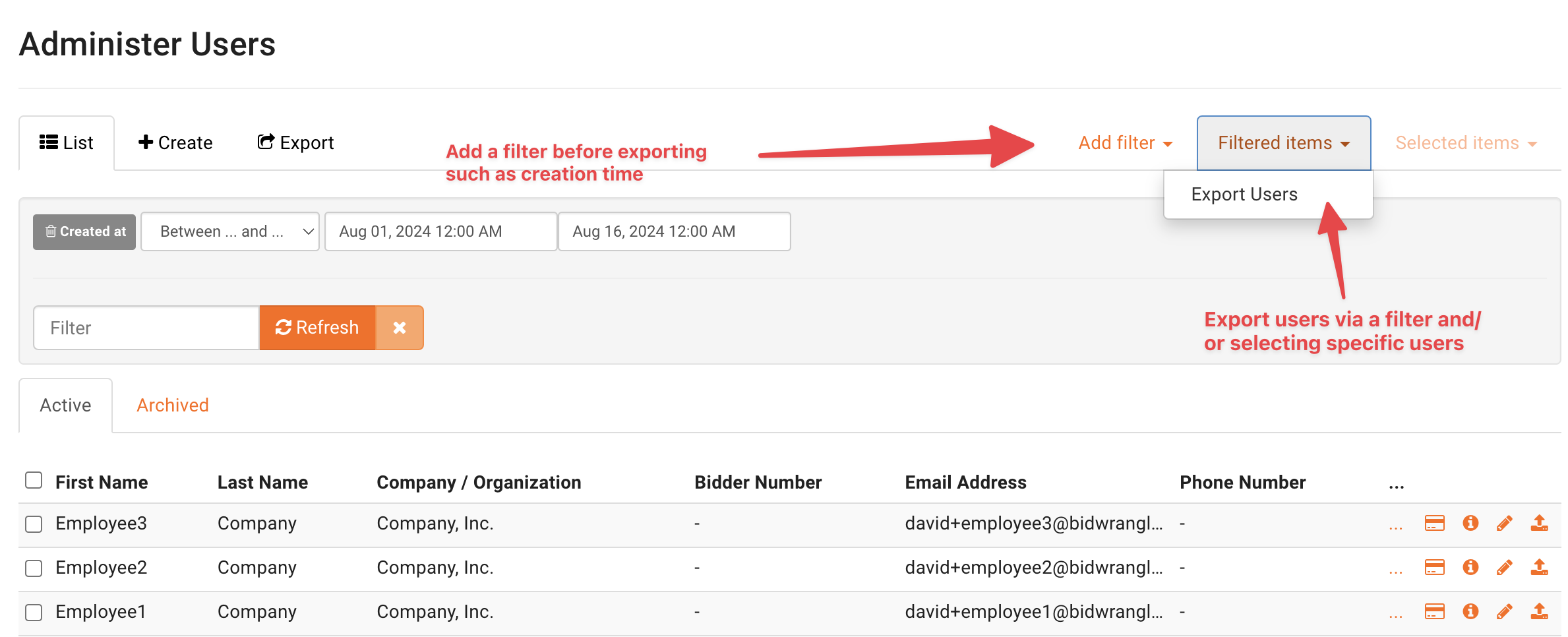
Within the Admin Portal, you will find a menu under Company entitled, "Users." From this Administer Users screen, bidders can be sorted by a variety of filters and exported from the system. Navigate to Users and click "Add Filter" to select the specific users you want to export.
Suggested Filters
Created At - allows you to set a date range for when accounts were created. Helpful when looking for recently created accounts
Location - search by a keyword in their location fields, for example, a location filter that contains 'MN' would bring up all bidders in Minnesota
Marketing Code - allows you to find users who have been tagged with a specified marketing code
Custom User Fields - export searches based on your own customized user fields
If you are selecting a specific auction, you may consider exporting from the "Registrations" screen instead.
Once you have filtered for the desired users, "Filtered items" > "Export Users" will bring you to the Export Users screen.
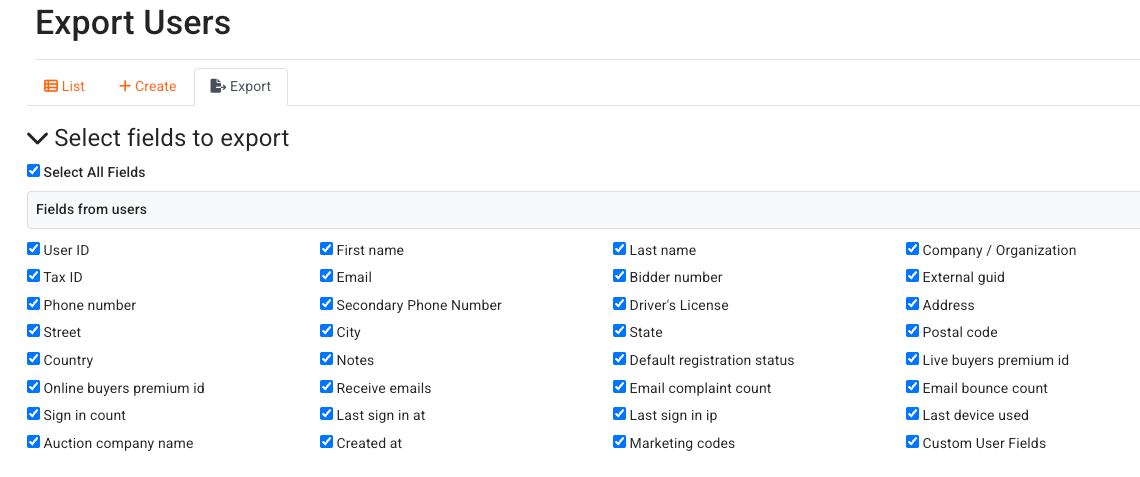
Below is a screenshot of the available fields you can choose from. The "Select All Fields" checkbox will allow you to quickly deselect all fields so you can choose only the fields you need. In most cases, you can leave the fields in "Options for CSV" blank and click "Export to csv."
Users Export or Registrations Export: Which One Do You Need?
BidWrangler has two export screens for bidder data, and they answer different questions. The Users export on this page pulls from your full account list. The Registrations screen pulls bidders for one auction.
Use the Users export on the Administer Users screen when you want bidders across your whole account. This is the correct export for a full contact list or an email marketing list.
Use the Registrations screen when you want the bidders registered for one specific auction. See Export Registrations for more details.
How to Keep an Email Marketing List Current with Routine Exports
Many auction companies use the Users export to keep a Mailchimp or other email marketing audience up to date. The platform does not push new bidders to your email marketing tool automatically. A routine export does the same job in a few clicks.
Set a regular interval for the task. Weekly or monthly works well for most companies
On the Administer Users screen, click Add Filter and filter your users by Created Date. Set the range to the period after your last export
Click Filtered Items, then click Export Users
Select the fields that your email marketing tool needs. Name and email address are usually enough
Click Export to csv
Import the CSV file into your email marketing tool. In Mailchimp, use the file when you import or update your audience
Frequently Asked Questions
How do I export only the bidders who signed up since my last export? | Filter your users by Created Date on the Administer Users screen before you export. Set the date range to the period after your last export. Then use Filtered Items and Export Users so the file contains only the new bidders. |
Does the export include every user in my account? | It can. If you export without a filter, the file contains your full user list. Apply a filter first, then use Filtered Items, and the file contains only the users that match your filter. |
How do I get the bidders for just one auction? | Use the Registrations screen instead of the Users export. The Registrations screen shows who registered for a specific auction, and it has its own export. The article How do I pull Bidder Information for a Specific Auction? shows the steps. |
What file format does the export create? | The export creates a CSV file. Spreadsheet programs and email marketing tools such as Mailchimp accept CSV files directly, so no conversion step is needed. |
Which staff members can run a bidder export? | The user must have a permission level with access to the Users area of the Admin Portal. Admin permission includes this access. The Permissions Guide shows what each permission level allows. |
If you have questions about exports or need a hand with your email marketing workflow, contact us at helpdesk@bidwrangler.com.